How to View Sales and Performance Reports in ChannelSale
ChannelSale provides a centralized Calculus Reports dashboard where sellers can monitor sales, orders, revenue, spending, and performance across marketplaces and comparison shopping engines.
Access the Reports Dashboard
- Log in to your ChannelSale account.
- From the top navigation menu, click Calculus Reports.
- Select the Dashboard tab.
- Use the Refine by options to select the reporting period:
- 7 Days
- 15 Days
- 30 Days
- Use +Filter to apply additional filters, if available.
Cross Channel Sales Report
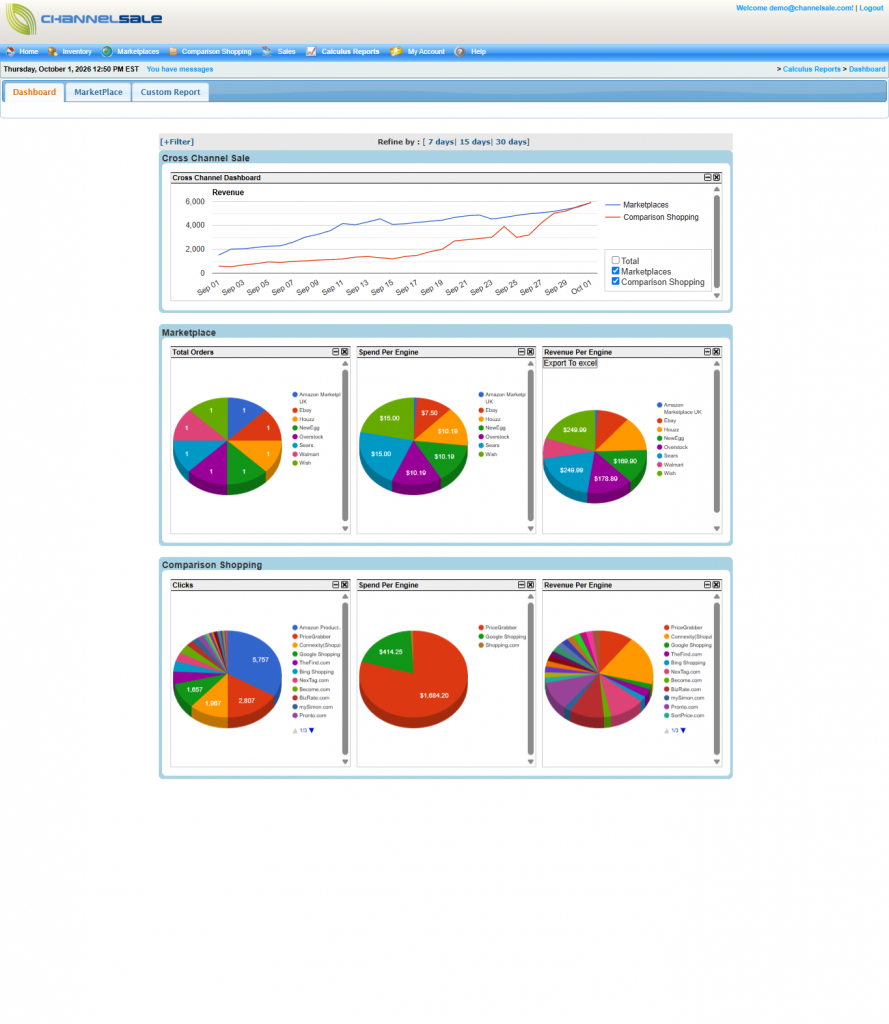
The Cross Channel Sale section provides an overview of revenue across different sales channels.
You can:
- Compare revenue from Marketplaces and Comparison Shopping.
- View revenue trends over the selected period.
- Select or deselect Total, Marketplaces, and Comparison Shopping to customize the graph.
Marketplace Reports
The Marketplace section provides the following reports:
Total Orders
View the total number of orders received through your connected marketplaces.
The report can help you compare order activity across marketplaces such as Amazon, eBay, Walmart, Newegg, Sears, and Wish.
Spend Per Engine
View and compare spending across your marketplace engines.
Revenue Per Engine
View the revenue generated by each marketplace and compare the contribution of different marketplaces.
If available, click Export To Excel to export the report data for further analysis.
Comparison Shopping Reports
The Comparison Shopping section provides performance information for comparison shopping engines.
Clicks
View the number of clicks generated through your comparison shopping channels.
Spend Per Engine
Review spending across individual comparison shopping engines.
Revenue Per Engine
Compare the revenue generated by each comparison shopping engine.
Custom Reports
To generate a report based on specific requirements:
- Click the Custom Report tab.
- Select the required report criteria and filters.
- Generate the report.
- Review or export the resulting data, if an export option is available.
Report Summary
| Report | What you can check |
|---|---|
| Cross Channel Sale | Revenue trends across marketplaces and comparison shopping |
| Total Orders | Orders received from marketplaces |
| Spend Per Engine | Spending by marketplace or comparison shopping engine |
| Revenue Per Engine | Revenue generated by each sales channel |
| Clicks | Click activity from comparison shopping engines |
| Custom Report | Reports based on selected criteria and filters |
Note: The reports and data available may vary based on the marketplaces, comparison shopping engines, and services configured for your ChannelSale account.