Search …
This page covers the following sections:
- Plans and Pricing
- Things to Know Before Connecting
- Steps to Add Walmart API Details in ChannelSale
- Disconnecting the Walmart Connection
======================================
Plans and Pricing
There is no charge to use ChannelSale for the following:
Free Plan – Inventory & Order Sync
- Sync up to 500 marketplace products
- Sync up to 15 marketplace orders per month
Free Trial
- Includes all features available in the Free Plan
- Publish sample product listings to one marketplace of your choice: Amazon, Walmart, or eBay
For additional information on pricing plans, refer to ChannelSale Pricing for more information.
======================================
Things to Know Before Connecting
Important: To avoid data conflicts, only one app should be connected to your store at a time. If you’re switching to ChannelSale from another service provider, disconnect and uninstall the existing connecttion before connecting to ChannelSale.
Before connecting to a marketplace, ensure the following requirements are met:
- Verified Seller Account: You must have a verified seller account and be approved to sell on the marketplace.
- Store Policies: Your store policies must be published and visible on the marketplace in accordance with its requirements.
- Payment Details: You must have a valid payment method configured with the marketplace and a bank account linked to receive your marketplace payments.
- Shipping Rates: Configure the required shipping rates for the marketplace where you plan to sell.
To learn about setting up shipping for eBay, refer to Shipping for sellers.
======================================
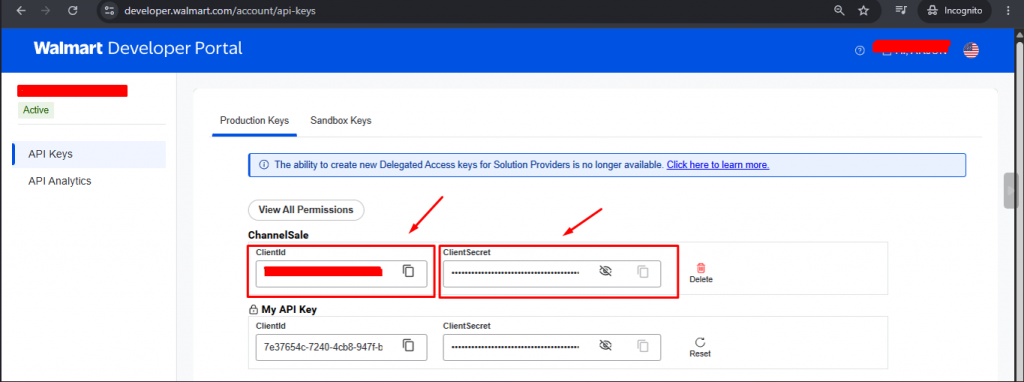
Steps to Generate Walmart API Keys
- Log in to your Walmart account.
- Navigate to Settings and click on Consumer Id and Private Key
- Select the appropriate Walmart marketplace/country (for example, Walmart US).
- You will be directed to Walmart Developer Portal.
- Add ChannelSale as a Solution Provider.
Next steps is to login to your ChannelSale account to add API details.
Steps to add Walmart Details in ChannelSale
- Log in to your ChannelSale account.
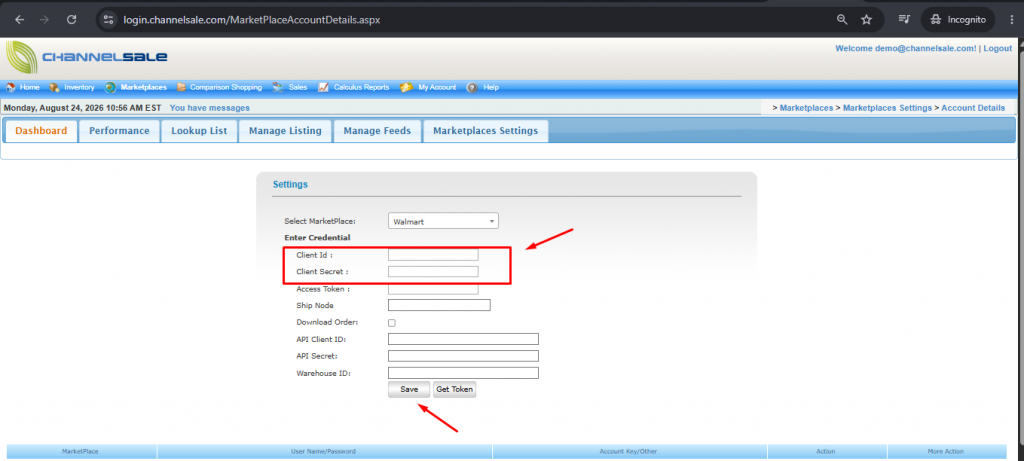
- Navigate to Marketplaces → Marketplace Settings → Account Details.
- Select the appropriate Walmart marketplace/country (for example, Walmart US).
- Add the ClientID and Secret Key
- Save the settings and proceed with the Walmart marketplace configuration.
This authorization flow is consistent with Walmart OAuth process, where the seller grants permission to an application and Walmart returns authorization information that the application uses to obtain the required tokens.
Steps to Disconnect Walmart API Details in ChannelSale
- Log in to your ChannelSale account.
- Navigate to Marketplaces → Marketplace Settings → Account Details.
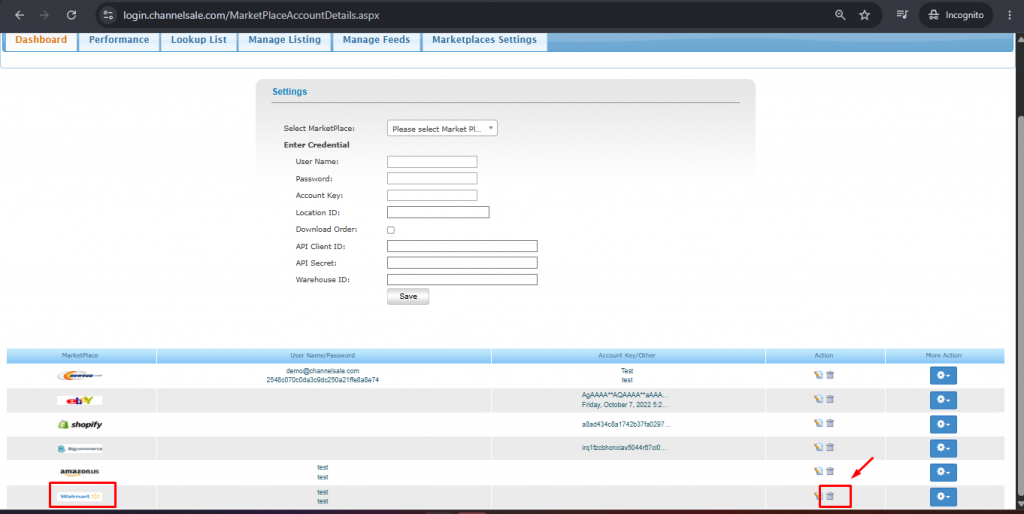
- Scroll to the bottom on the page and search for the Walmart marketplace connection.
- Click on the delete option on the extreme right of the setup.